
Every website owner wants better rankings, faster pages, and higher conversions. Yet many teams spend weeks chasing performance scores without knowing which improvements actually impact business results.
Core Web Vitals are Google's user experience metrics that measure how quickly a page loads, how responsive it feels, and how visually stable it remains during loading. While achieving a high Lighthouse score is helpful, the ultimate goal is creating a fast, seamless experience that encourages visitors to stay, engage, and convert.
At LaunchNest, we focus on optimizing the metrics that directly influence revenue rather than simply improving benchmark scores.
This guide explains the three Core Web Vitals that matter most, why they affect SEO and conversions, and how to optimize them effectively.
What Are Core Web Vitals?
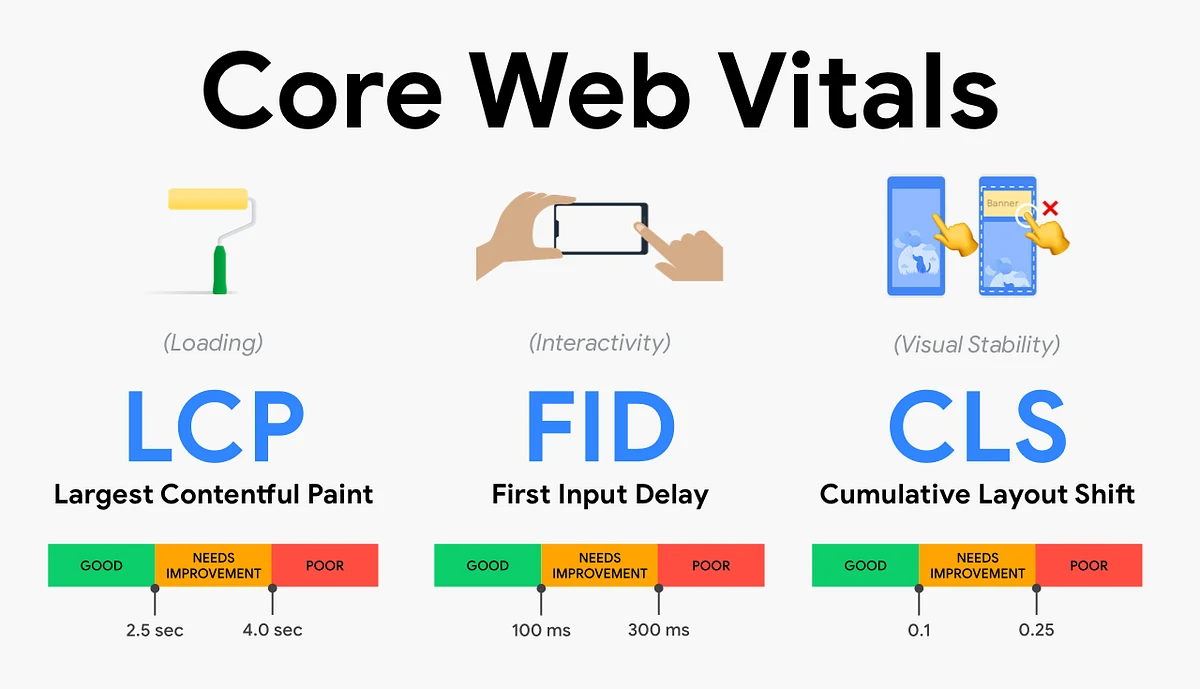
Core Web Vitals are Google's standardized metrics used to evaluate real-world user experience.
The three primary metrics are:
- Largest Contentful Paint (LCP)
- Interaction to Next Paint (INP)
- Cumulative Layout Shift (CLS)
Together, they help determine whether users experience a fast, responsive, and stable website.
Although they are only one part of Google's ranking algorithm, they significantly influence user satisfaction and conversion rates.
Why Core Web Vitals Matter for SEO
Fast websites create better experiences.
When users can quickly view content, interact without delays, and navigate without unexpected layout shifts, they're more likely to remain on your site.
Strong Core Web Vitals can help:
- Improve search visibility
- Increase organic traffic
- Reduce bounce rates
- Increase conversion rates
- Improve customer satisfaction
- Build trust with visitors
More importantly, faster websites often generate more leads and sales.
Largest Contentful Paint (LCP): The First Impression
Largest Contentful Paint measures how long it takes for the largest visible content element to appear on the screen.
This is often:
- A hero image
- A large heading
- A banner
- Featured content
Google recommends an LCP of 2.5 seconds or less.
Why LCP Matters
Users decide within seconds whether a website feels fast.
If your primary content loads slowly, visitors may leave before interacting with the page.
Slow LCP often results from:
- Large, unoptimized images
- Slow server response times
- Render-blocking CSS
- Heavy JavaScript
- Poor caching
How to Improve LCP
- Compress and optimize images using modern formats like WebP or AVIF.
- Enable server-side caching.
- Minimize render-blocking resources.
- Use a Content Delivery Network (CDN).
- Reduce unnecessary third-party scripts.
- Improve hosting performance.
Interaction to Next Paint (INP): Responsiveness Matters
Interaction to Next Paint measures how quickly a website responds when users click, tap, or type.
Unlike older metrics, INP evaluates responsiveness throughout the entire user session.
Google recommends keeping INP below 200 milliseconds.
Why INP Affects Revenue
Visitors expect instant feedback.
Delays when clicking buttons, opening menus, or submitting forms create frustration and increase abandonment rates.
Poor INP commonly affects:
- Ecommerce checkout pages
- Contact forms
- SaaS dashboards
- Interactive landing pages
Common Causes
- Large JavaScript bundles
- Long-running browser tasks
- Excessive third-party scripts
- Heavy animations
- Poor frontend optimization
How to Improve INP
- Split JavaScript into smaller chunks.
- Delay non-essential scripts.
- Remove unused libraries.
- Optimize event handlers.
- Reduce main-thread blocking.
Cumulative Layout Shift (CLS): Build Trust Through Stability
CLS measures unexpected movement of page elements while a page is loading.
Have you ever tried clicking a button only for an advertisement or image to push everything down?
That's layout shift.
Google recommends maintaining a CLS score below 0.1.
Why CLS Matters
Unexpected movement creates frustration and reduces trust.
Visitors may accidentally click the wrong element or abandon the page altogether.
Common Causes
- Images without dimensions
- Dynamic advertisements
- Late-loading fonts
- Embedded videos
- Popups inserted after page load
How to Improve CLS
- Always define image dimensions.
- Reserve space for advertisements.
- Preload important fonts.
- Avoid inserting new content above existing elements.
- Use proper CSS sizing.
Which Core Web Vital Has the Biggest Business Impact?
Although all three metrics matter, they influence different parts of the user experience.
MetricBusiness Impact
Largest Contentful Paint (LCP)
Improves first impressions and reduces bounce rates
Interaction to Next Paint (INP)
Improves usability and increases conversions
Cumulative Layout Shift (CLS)
Builds trust and reduces accidental interactions
For most businesses, improving LCP and INP typically delivers the greatest return on investment.
Common Performance Mistakes
Many websites unintentionally create performance issues by:
- Installing too many plugins
- Loading multiple analytics tools
- Using oversized images
- Ignoring browser caching
- Loading all JavaScript immediately
- Not optimizing fonts
- Adding unnecessary marketing scripts
Regular performance audits help identify and eliminate these bottlenecks.
How to Measure Core Web Vitals
Use reliable tools to monitor your website's performance:
- Google PageSpeed Insights
- Chrome Lighthouse
- Chrome DevTools Performance Panel
- Google Search Console (Core Web Vitals Report)
- Chrome User Experience Report (CrUX)
These tools provide actionable recommendations based on real-world user data.
Core Web Vitals Best Practices
To maintain excellent performance:
- Optimize images before uploading.
- Minify CSS and JavaScript.
- Remove unused code.
- Enable browser caching.
- Use lazy loading for non-critical images.
- Implement a CDN.
- Reduce third-party scripts.
- Test performance after every major update.
- Monitor Core Web Vitals regularly.
Performance optimization should be part of your ongoing SEO strategy, not a one-time project.
Final Thoughts
Core Web Vitals are more than technical metrics—they directly influence how users experience your website and whether they choose to stay, engage, and convert.
Instead of chasing perfect performance scores, focus on improvements that create measurable business value. Prioritize faster loading, smoother interactions, and stable layouts to build trust, improve SEO, and increase conversions.
At LaunchNest, we help businesses optimize Core Web Vitals through technical SEO, performance engineering, and user-focused development strategies that deliver lasting results.
Related service: Technical SEO & Content — Technical SEO & content for software companies.