
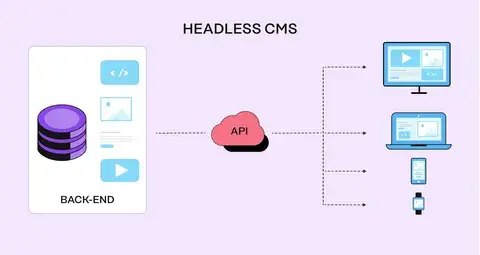
Businesses today publish content across more platforms than ever. A company might have a website, mobile application, customer portal, digital product, or other connected experiences.
Traditional content management systems can make managing these experiences more difficult because content and presentation are often closely connected.
A headless CMS takes a different approach by separating the content management system from the front-end experience.
This architecture gives development teams more flexibility in how and where content is displayed.
What Is a Headless CMS?
A headless CMS is a content management system where the content management layer is separated from the front-end presentation layer.
Instead of directly controlling how content appears on a specific website, the CMS stores and manages content that can be delivered through APIs.
This means the same content can potentially be used across:
- Websites
- Mobile applications
- Web applications
- Digital displays
- Customer portals
- Other connected platforms
How Does a Headless CMS Work?
The basic architecture has three major components:
Content Management Layer
Editors create and manage content through the CMS.
API Layer
The API delivers content to different applications and platforms.
Front End
Developers use technologies such as React, Next.js, Vue, or other frameworks to create the user experience.
This separation gives developers greater control over the front end while allowing content teams to manage information independently.
Benefits of a Headless CMS
Greater Flexibility
Developers aren't restricted to the front-end templates of a traditional CMS.
They can use modern frameworks and development approaches to build custom experiences.
Better Scalability
A headless architecture can make it easier to expand your digital presence across multiple platforms.
The same content infrastructure can potentially support different front ends.
More Development Control
Development teams have greater control over:
- Performance
- Architecture
- User experience
- Integrations
- Front-end technology
Multi-Platform Content
If your business needs to publish the same information across multiple digital experiences, a headless CMS can simplify content management.
Headless CMS vs Traditional CMS
Traditional CMS platforms combine content management and presentation more closely.
A headless CMS separates these layers.
A traditional CMS may be easier for smaller websites because it often provides themes, plugins, and built-in functionality.
A headless CMS can provide greater flexibility but usually requires more development expertise.
When Should You Consider a Headless CMS?
A headless CMS may be a good choice if you:
- Need multiple digital front ends
- Require a highly customized website
- Want complete front-end control
- Have a development team
- Need complex integrations
- Expect significant future growth
- Want an API-first content architecture
When a Headless CMS May Not Be Necessary
Headless isn't automatically better.
A traditional CMS may be a better option if:
- Your website is relatively simple
- Your budget is limited
- You need to launch quickly
- You don't have development resources
- You rely heavily on ready-made plugins
- You only need one primary website
Choosing technology should depend on your actual business requirements.
Performance Considerations
A headless CMS can support high-performance websites, but architecture matters.
Performance depends on factors such as:
- Front-end framework
- Hosting
- API performance
- Image optimization
- Caching
- JavaScript
- Content delivery
Simply choosing a headless CMS won't automatically make your website faster.
Consider the Total Cost
Headless development can require more upfront investment because developers need to build and maintain more of the front-end architecture.
Consider:
- Development costs
- Hosting
- CMS costs
- API usage
- Maintenance
- Developer resources
- Integrations
The right solution is the one that provides enough value to justify its complexity.
Final Thoughts
A headless CMS can provide flexibility, scalability, and greater control over the digital experience. However, it isn't the right solution for every business.
Before choosing a CMS architecture, consider your website's complexity, business goals, development resources, budget, and long-term plans.
For businesses that need custom digital experiences and multiple content channels, headless architecture can be a powerful option.
LaunchNest helps businesses evaluate and build modern web architectures based on their specific requirements, from traditional CMS websites to custom and headless solutions.